Getting started
marimohub runs on your infrastructure. An operator usually does four things: try it locally, choose production backends, generate configuration, then deploy.
1. Try the local stack
Run the hub with no external services before choosing providers:
pnpm install --frozen-lockfile
pnpm dev
The local stack uses memory storage, local subprocess compute, and dev auth. It is useful for evaluation and development, but it is not durable and must not serve real users. See Testing locally for details.
Open a notebook to edit Python cells and explore their outputs in marimo.
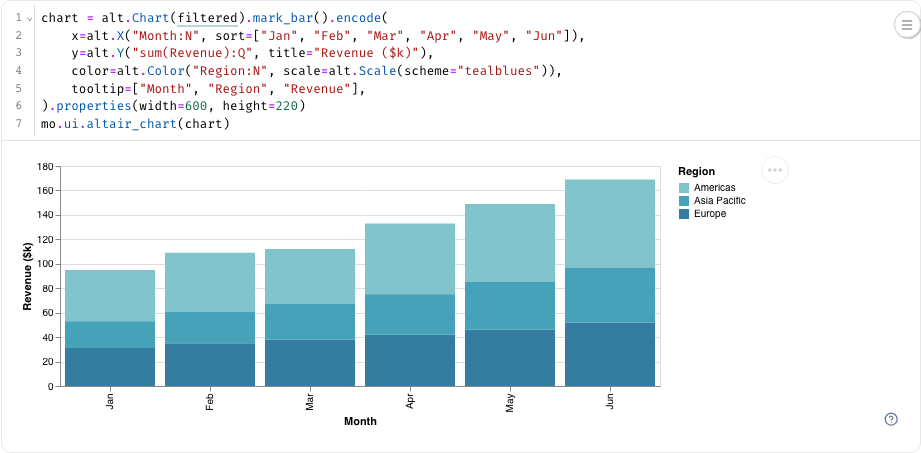
The Docker Compose example uses filesystem storage to preserve notebooks across restarts and runs kernels inside the hub container. This dev-auth setup is for local evaluation only.
2. Choose production backends
Every deployment picks one option for each port.
| Decision | Common options | Guide |
|---|---|---|
| Storage - where notebooks live | CAIOS, AWS S3, GCS, Azure Blob Storage, MinIO, R2 | Storage |
| Compute - where kernels run | CoreWeave Sandboxes, Modal, Kubernetes, Docker, Podman | Compute |
| Auth - who can sign in | OpenID Connect (Google, Okta, Auth0), Cloudflare Access | Auth |
Storage is the decision to make first. It holds the durable state and must support atomic conditional writes.
Optional capabilities:
- Managed AI gives notebook users an AI assistant without exposing the upstream provider key.
- Environment & cloud access configures data sources, environment variables, secret sources, and federated cloud access.
- Syncing serves read-only notebooks whose source of truth is pushed in from another system.
3. Generate configuration
Most operators use environment variables and the prebuilt server. Teams with custom adapters can compose the packages directly as a library. See Deployment options for the trade-off.
Use the configurator to generate a .env, Helm values, Docker Compose service, or equivalent library wiring. The result is a scaffold: replace every _replace_me_ value, using its # e.g. comment as a guide, then review the optional values before deploying.
Any S3-compatible store: CoreWeave CAIOS, AWS S3, MinIO, Tigris, Ceph, or Cloudflare R2 via its S3 endpoint. Point `*_S3_ENDPOINT` at the provider.
Modal sandboxes.
App-native OpenID Connect (the production backend). If the allowlist contains one domain, Google receives it as the `hd` hint.
No managed AI. The marimo assistant still works if a user supplies their own key in marimo settings.
# --- Storage ---
MARIMOHUB_STORAGE_BACKEND=s3
MARIMOHUB_STORAGE_S3_BUCKET=_replace_me_  # e.g. orgname-marimohub
MARIMOHUB_STORAGE_S3_ENDPOINT=https://s3.us-east-1.amazonaws.com
MARIMOHUB_STORAGE_S3_REGION=us-east-1
MARIMOHUB_STORAGE_S3_ACCESS_KEY_ID=  # secret
MARIMOHUB_STORAGE_S3_SECRET_ACCESS_KEY=  # secret
MARIMOHUB_STORAGE_S3_FORCE_PATH_STYLE=true

# --- Compute ---
MARIMOHUB_COMPUTE_BACKEND=modal
MARIMOHUB_COMPUTE_IMAGE=_replace_me_  # e.g. ghcr.io/orgname/marimo-sandbox:latest
MARIMOHUB_COMPUTE_SANDBOX_HOSTNAME=hub.example.com
MARIMOHUB_COMPUTE_WORKDIR=/workspace
MARIMOHUB_COMPUTE_ASSET_URL=https://cdn.jsdelivr.net/npm/@marimo-team/frontend@{version}/dist
MARIMOHUB_SANDBOX_STARTUP_TIMEOUT_SECONDS=120
MARIMOHUB_COMPUTE_MODAL_TOKEN_ID=_replace_me_  # required, secret
MARIMOHUB_COMPUTE_MODAL_TOKEN_SECRET=_replace_me_  # required, secret
MARIMOHUB_COMPUTE_MODAL_ENVIRONMENT=notebooks
MARIMOHUB_COMPUTE_MODAL_APP_NAME=marimohub

# --- Auth ---
MARIMOHUB_AUTH_BACKEND=oidc
MARIMOHUB_AUTH_OIDC_ISSUER=_replace_me_  # e.g. https://accounts.example.com
MARIMOHUB_AUTH_OIDC_CLIENT_ID=_replace_me_  # required
MARIMOHUB_AUTH_OIDC_CLIENT_SECRET=_replace_me_  # required, secret
MARIMOHUB_AUTH_OIDC_REDIRECT_URI=_replace_me_  # e.g. https://hub.example.com/api/auth/callback
MARIMOHUB_AUTH_OIDC_AUDIENCE=
MARIMOHUB_AUTH_OIDC_PROMPT=consent
MARIMOHUB_AUTH_SESSION_SECRET=_replace_me_  # required, secret
MARIMOHUB_AUTH_ALLOWED_EMAIL_DOMAINS=_replace_me_  # e.g. example.com,example.org

# --- Managed AI ---
MARIMOHUB_AI_BACKEND=none

# --- Options ---
MARIMOHUB_EDITOR_SANDBOX_SHARING=shared
MARIMOHUB_PERSIST_WORKSPACE=source
Setup
How to provision and connect each backend you picked above.
StorageS3 / S3-compatible Full docs →
Works with any S3-compatible store (AWS S3, MinIO, Tigris, Ceph, CoreWeave CAIOS, or Cloudflare R2 via its S3 endpoint).
- Create a bucket for marimohub.
- Get credentials with read/write on that bucket (an access key + secret), or rely on the instance/SDK default credential chain on AWS.
- Set the env:
MARIMOHUB_STORAGE_BACKEND=s3
MARIMOHUB_STORAGE_S3_BUCKET=orgname-marimohub
MARIMOHUB_STORAGE_S3_ENDPOINT=https://s3.us-east-1.amazonaws.com  # omit for AWS
MARIMOHUB_STORAGE_S3_REGION=us-east-1
MARIMOHUB_STORAGE_S3_ACCESS_KEY_ID=…       # secret — or use the SDK default chain
MARIMOHUB_STORAGE_S3_SECRET_ACCESS_KEY=…   # secret
Your store must support conditional writes
marimohub uses S3 If-Match to update notebooks safely and refuses to start on
a store that doesn't honor it. AWS S3, R2, Tigris, CoreWeave CAIOS, and recent
MinIO all qualify; very old MinIO/Ceph builds may not.
MinIO / Ceph need path-style addressing
Set MARIMOHUB_STORAGE_S3_FORCE_PATH_STYLE=true for MinIO and Ceph, or requests
to the bucket will fail to resolve.
CoreWeave CAIOS
CAIOS (CoreWeave AI Object Storage) is CoreWeave's S3-compatible store and the
storage half of the CKS deployment. Use the s3 backend and
point the endpoint at CAIOS:
MARIMOHUB_STORAGE_BACKEND=s3
MARIMOHUB_STORAGE_S3_BUCKET=orgname-marimohub
MARIMOHUB_STORAGE_S3_ENDPOINT=https://cwobject.com
MARIMOHUB_STORAGE_S3_ACCESS_KEY_ID=…         # CAIOS access key (secret)
MARIMOHUB_STORAGE_S3_SECRET_ACCESS_KEY=…     # CAIOS secret key (secret)
ComputeModal Full docs →
- Create a Modal account.
- In the dashboard, open Settings → API Tokens and create a token (you get a token id and secret).
- Build/publish a sandbox image (marimo + uv + python).
- Set the env:
MARIMOHUB_COMPUTE_BACKEND=modal
MARIMOHUB_COMPUTE_MODAL_TOKEN_ID=…              # secret
MARIMOHUB_COMPUTE_MODAL_TOKEN_SECRET=…          # secret
MARIMOHUB_COMPUTE_MODAL_ENVIRONMENT=notebooks   # optional named environment
# MARIMOHUB_COMPUTE_MODAL_SECRETS=shared-credentials,huggingface
MARIMOHUB_COMPUTE_IMAGE=ghcr.io/orgname/marimo-sandbox:latest
MARIMOHUB_SESSION_IDLE_TIMEOUT_SECONDS=1800     # save and stop after 30 idle minutes
# MARIMOHUB_SESSION_APP_IDLE_TIMEOUT_SECONDS=7200  # optional app override
For private named Modal images
published with image.publish(), prefix the name with modal://:
MARIMOHUB_COMPUTE_IMAGE=modal://marimo-sandbox:v1
The tag defaults to latest. Unqualified names resolve in MARIMOHUB_COMPUTE_MODAL_ENVIRONMENT,
or the workspace default when unset. A name that contains /, such as
modal://my-workspace/notebooks/marimo-sandbox:v1, names its own namespace and ignores
that variable. The configured token must have access to the image.
Registry images and named Modal images can share a
comma-separated image list.
No infrastructure to run
Modal is fully serverless — nothing to provision or scale, and you pay only for running kernels. The easiest path if you don't already run a cluster.
The adapter uses the supported Modal JavaScript SDK to create and reconnect to
sandboxes. When MARIMOHUB_COMPUTE_MODAL_ENVIRONMENT is set, apps and sandboxes
are isolated in that Modal environment. It passes compute profiles through the
SDK's cpu, memoryMiB, and gpu options. Modal sets its idle timeout to 1.5
times the effective timeout for each session mode. This fallback gives the hub
time to save an edit session and stop its sandbox first.
MARIMOHUB_COMPUTE_MODAL_SECRETS accepts comma-separated
Modal secret names, not secret values.
Every new editor, app, and job sandbox receives them as environment variables
across the deployment.
The secrets must exist in MARIMOHUB_COMPUTE_MODAL_ENVIRONMENT, or the workspace
default when unset. An empty or unset list adds none.
Any secret lookup failure prevents sandbox creation. The error names the secret, the variable, and the Modal environment. The boot preflight also resolves each secret, so it reports a misspelled name at startup. Existing sandboxes retain their secrets.
Deployment-wide secrets
marimohub injects these secrets into every editor, app, and job sandbox in every
project. Any notebook author can read the values. For credentials that belong to
one project, use project integration secret references instead. Secret keys must avoid
hub-reserved names. A MARIMO_* value
set here takes precedence over the same variable in a project integration.
Cold starts & shared workspaces
A freshly-started kernel can take a few seconds to boot; a warm sandbox image
(Sandbox image) helps. If multiple apps share one Modal
workspace, set MARIMOHUB_COMPUTE_MODAL_APP_NAME so marimohub only reaps its
own sandboxes.
AuthOIDC Full docs →
App-native OpenID Connect is the production backend. marimohub discovers the
provider endpoints from /.well-known/openid-configuration. You supply the
issuer, client credentials, and redirect URI.
MARIMOHUB_AUTH_BACKEND=oidc
MARIMOHUB_AUTH_OIDC_ISSUER=https://accounts.example.com
MARIMOHUB_AUTH_OIDC_CLIENT_ID=…
MARIMOHUB_AUTH_OIDC_CLIENT_SECRET=…
MARIMOHUB_AUTH_OIDC_REDIRECT_URI=https://hub.example.com/api/auth/callback
MARIMOHUB_AUTH_SESSION_SECRET=…            # signs the session cookie (HS256, ≥32 bytes)
MARIMOHUB_AUTH_ALLOWED_EMAIL_DOMAINS=example.com  # REQUIRED allowlist (verified email); `*` allows all
# MARIMOHUB_AUTH_OIDC_AUDIENCE=…           # deprecated and ignored; aud must contain the client ID
# MARIMOHUB_AUTH_OIDC_PROMPT=consent       # optional: override the default (select_account) OAuth prompt
# MARIMOHUB_AUTH_OIDC_SCOPES="openid email profile groups" # add only provider-required scopes
The redirect URI is always https://<your-host>/api/auth/callback. Register
this exact value with your provider. A different value causes a
redirect_uri_mismatch error. ALLOWED_EMAIL_DOMAINS is required. Set one
or more domains, or set * to allow all.
The login email comes from UserInfo when it supplies email, otherwise from
the ID token. UserInfo must match the validated ID token's sub.
By default, the email source must supply email_verified. Every present claim
in either source must be boolean true or the exact string "true" (Cognito
compatibility). MARIMOHUB_AUTH_OIDC_EMAIL_VERIFICATION=trusted-issuer permits
missing claims only, including with a domain allowlist.
The signed session JWT has a 3,800-byte limit. If necessary, marimohub omits the profile picture first and the display name second. Required identity and authorization claims are never omitted. Login fails if they exceed the limit.
The issuer, callback, discovered authorization, and discovered logout endpoints must use HTTPS and cannot contain embedded credentials.
Groups and roles
Group authorization is optional and uses exact provider group IDs. Set a JSON Pointer to the provider array. Then set at least one group policy:
MARIMOHUB_AUTH_OIDC_GROUPS_CLAIM=/groups
MARIMOHUB_AUTH_OIDC_ALLOWED_GROUPS=hub-users
MARIMOHUB_AUTH_OIDC_SUPER_ADMIN_GROUPS=hub-platform-admins
MARIMOHUB_AUTH_OIDC_PROJECT_CREATION_GROUPS=hub-project-creators
MARIMOHUB_AUTH_OIDC_DEFAULT_APP_USER_GROUPS=hub-app-users
MARIMOHUB_AUTH_OIDC_DEFAULT_VIEWER_GROUPS=hub-viewers
MARIMOHUB_AUTH_OIDC_DEFAULT_EDITOR_GROUPS=hub-editors
MARIMOHUB_AUTH_OIDC_DEFAULT_MANAGER_GROUPS=hub-project-managers
Nested claims use JSON Pointer syntax, such as /realm_access/roles.
Array elements use zero-based indices, such as /identities/0/groups.
ALLOWED_GROUPS controls login. The other lists map groups to internal
entitlements. The session stores mapped entitlements and only the selected
membership group IDs. Without membership selection, the session stores no group IDs.
If ALLOWED_GROUPS is set, it must contain at least one group ID. An empty list
fails at startup. Unset it to disable the login group restriction.
PROJECT_CREATION_GROUPS controls who can create projects:
- If unset, project creation policy applies, including the app-only exception.
- If the value is empty, only super admins can create projects.
- If the value contains group IDs, super admins and matching users can create projects.
If no super admin is configured, an empty value prevents every user from creating projects.
Setting the variable implies MARIMOHUB_PROJECT_CREATION=restricted, which also
works without group mapping; combining it with MARIMOHUB_PROJECT_CREATION=open
is rejected at startup.
An empty value does not require GROUPS_CLAIM. A non-empty value requires the claim and creates a group-derived session entitlement.
Group sessions last at most one hour by default. This limit bounds the delay after an IdP removes a user from a group. Kernels inherit the session JWT expiry as a fixed authorization deadline. Active editors cannot extend it. Session reuse keeps the earliest caller credential deadline. At expiry, the lifecycle destroys the kernel and the proxy closes WebSockets. This teardown skips the final capture so that the kernel stops promptly. Periodic snapshots limit potential data loss.
Missing, malformed, or oversized group data cannot satisfy the login policy. marimohub accepts at most 200 group IDs. It does not resolve group-overage references from the provider. Configure the IdP to emit only the groups that marimohub needs. Group-derived roles and project-creation access apply to browser sessions and enabled external access tokens. They do not transfer to personal access tokens.
After you enable project-creation groups, matching users must sign in again. Existing sessions do not contain the new entitlement.
For a strict rollout, first deploy the new version without the variable. Then set the variable after all replicas run the new version.
The user ID is the OIDC sub within the configured issuer. The same sub from
another issuer can identify a different person. Therefore, an issuer URL change
is an identity migration. Reconcile stored owners and members before the change.
Generate a session secret with openssl rand -base64 32.
Group membership
To retain selected group IDs in the current credential, configure exact IDs, prefixes, or both:
MARIMOHUB_AUTH_OIDC_GROUPS_CLAIM=/groups
MARIMOHUB_AUTH_OIDC_MEMBERSHIP_GROUPS=hub-team-data,hub-team-ml
MARIMOHUB_AUTH_OIDC_MEMBERSHIP_GROUP_PREFIXES=/marimohub/
Selection is case-sensitive: exact IDs match whole values; prefixes match the start of a value without a path boundary. Either list can select a group. Configure at most 200 exact IDs and 20 prefixes. The host trims spaces around each comma-separated entry. Empty lists and empty entries are invalid.
Use immutable group IDs
Matching is exact-string, and a matching group grants project roles. Configure the groups claim to emit immutable, IdP-unique IDs, such as Microsoft Entra object IDs or Okta group IDs, not display names. Never select groups that users can create or rename.
To select all groups, set MARIMOHUB_AUTH_OIDC_MEMBERSHIP_GROUPS='*'.
* must be the only entry, and MARIMOHUB_AUTH_OIDC_MEMBERSHIP_GROUP_PREFIXES
must be unset. Otherwise, startup fails.
The same ID limits and credential expiry apply. The raw provider claim remains limited to 200 entries, including duplicates.
Only this membership setting treats * as a wildcard. Prefixes, admission lists,
and role mappings remain literal; team-* is not a glob pattern.
IDs and prefixes must contain 1–128 Unicode characters, with no control
characters, commas, or leading or trailing whitespace. Internal spaces, @, and
leading / are valid. The host discards selected IDs that fail these rules;
malformed provider claims still fail admission. A missing claim produces no groups.
The host removes duplicate IDs and sorts them by code unit.
The selected set must fit within 32 groups and 1,280 UTF-8 bytes of JSON.
Overflow fails browser login with auth_failed or rejects external-token authentication. The host does not truncate the set.
If authentication exceeds these limits, narrow the group selection.
The cookie is signed, not encrypted, and GET /api/v1/me exposes selected groups.
Do not select sensitive group names. The identity directory stores no groups.
Logs contain counts only. oidc_session_issued records entitlements, retained
groups, and unretainable (selected values that fail the ID rules).
oidc_membership_groups_exceeded is an error-level event for overflow on both
browser login and external access tokens. It records the retained count.
External tokens also log oidc_access_token_rejected with reason
membership_groups_exceeded.
Group changes at the IdP take effect when the authenticated groups refresh.
Existing browser sessions can retain groups until the credential expires, within one hour.
External OIDC access tokens use the same selection rules and retain groups until token expiry.
Personal access tokens, service accounts, background work, and non-OIDC backends have no group source. Their /me response contains groups: [].
A matching project group membership grants its assigned role. Groups do not supply security labels or subject compartments.
For Microsoft Entra, select Groups assigned to the application to limit the provider claim. See Microsoft's group limits and application assignment. Group overage omits the claim and produces no retained groups. The host does not resolve overage references through Microsoft Graph.
Login-policy module
When a group mapping cannot express your access rule — for example, an approved department AND a minimum level AND a set of required attribute values — load a trusted login-policy module instead:
MARIMOHUB_AUTH_OIDC_LOGIN_POLICY_BACKEND=library
MARIMOHUB_AUTH_OIDC_LOGIN_POLICY_LIBRARY=/etc/marimohub/oidc-login-policy.mjs
# MARIMOHUB_AUTH_OIDC_LOGIN_POLICY_TIMEOUT_SECONDS=5        # 1–30; a timeout denies login
# MARIMOHUB_AUTH_OIDC_LOGIN_POLICY_SESSION_TTL_SECONDS=3600 # 300–3600
The built-in adapter still completes all OIDC protocol work: discovery, PKCE,
state and nonce, ID-token verification, UserInfo subject binding, email
verification, and the email-domain allowlist. The module runs after that
validation and before session signing. It receives the validated ID-token and
UserInfo claims as separate read-only objects and returns one bounded result: an
allow or deny decision, plus the built-in entitlements (super-admin,
project-creator, default-role:app-user, default-role:viewer,
default-role:editor, default-role:manager).
project-creator permits creation on restricted deployments and for app-only users.
MARIMOHUB_AUTH_OIDC_LOGIN_POLICY_BACKEND=none (or unset) disables the module.
A login-policy module cannot be combined with the group configuration above. It applies only to browser sessions. Personal access tokens receive neither its entitlements nor its groups.
The module runs in-process with server privileges. Bundle its dependencies into
one .mjs file, pin its version, and mount the same artifact on every replica.
Load errors stop server startup. Policy denials show a generic access-policy
message. Errors, timeouts, and malformed results fail login with a generic
sign-in error and a bounded operator log event.
An allow result can include groups: ['team-data', 'team-ml']. The host validates
these IDs against the membership limits, deduplicates them,
and sorts them. Omission produces groups: []. The module selects groups itself;
no host selection filter applies. Invalid IDs fail login rather than being discarded.
The host keeps raw claims out of storage and logs. Only selected groups enter the signed cookie. Review module code to prevent it from logging or storing claim values.
Invalid group results fail login with one of these bounded problem codes:
groups_not_an_array, invalid_group, too_many_groups, or groups_on_deny.
The policy analyzer shows selected groups and supports expected-group assertions.
Its login stage evaluates modules only, not environment-based group mappings.
The optional field keeps login-policy API version 1, but older hosts reject
groups as unknown_result_field. Deploy a host version that supports groups
on every replica before a module returns them.
Policy sessions last at most one hour, like group sessions, which bounds the delay after an attribute or policy change. A module change requires a server restart and takes effect on the next login.
The module controls login eligibility and deployment roles. It cannot see projects or notebooks, and entitlements never bypass project-role checks. See Security and the example module.
- In the Google Cloud Console, open APIs & Services → Credentials.
- Create Credentials → OAuth client ID, application type Web application.
- Under Authorized redirect URIs, add
https://hub.example.com/api/auth/callback. - Copy the Client ID and Client secret.
MARIMOHUB_AUTH_OIDC_ISSUER=https://accounts.google.com
MARIMOHUB_AUTH_OIDC_CLIENT_ID=…apps.googleusercontent.com
MARIMOHUB_AUTH_OIDC_CLIENT_SECRET=…
MARIMOHUB_AUTH_ALLOWED_EMAIL_DOMAINS=example.com   # a single domain is also sent to Google as the `hd` hint
The default OAuth prompt is select_account, which displays the Google
account chooser. Set MARIMOHUB_AUTH_OIDC_PROMPT=consent to display the consent
screen again.
See Google's OpenID Connect docs.
Microsoft Entra ID
- In the Entra admin center (or Azure Portal), go to App registrations → New registration.
- Set a Web redirect URI of
https://hub.example.com/api/auth/callback. - From Overview, copy the Application (client) ID and Directory (tenant) ID; under Certificates & secrets, create a client secret.
# tenant-scoped issuer (use `organizations` or `common` for multi-tenant)
MARIMOHUB_AUTH_OIDC_ISSUER=https://login.microsoftonline.com/<tenant-id>/v2.0
MARIMOHUB_AUTH_OIDC_CLIENT_ID=<application-client-id>
MARIMOHUB_AUTH_OIDC_CLIENT_SECRET=…
Okta
- In the Okta Admin Console, open Applications → Create App Integration.
- Choose OIDC - OpenID Connect and Web Application.
- Add
https://hub.example.com/api/auth/callbackas a Sign-in redirect URI. - Copy the Client ID and Client secret from the app's General tab.
MARIMOHUB_AUTH_OIDC_ISSUER=https://<your-org>.okta.com
MARIMOHUB_AUTH_OIDC_CLIENT_ID=…
MARIMOHUB_AUTH_OIDC_CLIENT_SECRET=…
If you use an Okta authorization server, the issuer is
https://<your-org>.okta.com/oauth2/<server-id>. See
Okta's OIDC docs.
Auth0
- In the Auth0 Dashboard, open Applications → Create Application and pick Regular Web Application.
- Under Settings → Allowed Callback URLs, add
https://hub.example.com/api/auth/callback. - Copy the Domain, Client ID, and Client Secret from Settings.
# note the trailing slash on the issuer
MARIMOHUB_AUTH_OIDC_ISSUER=https://<tenant>.auth0.com/
MARIMOHUB_AUTH_OIDC_CLIENT_ID=…
MARIMOHUB_AUTH_OIDC_CLIENT_SECRET=…
See Auth0's OIDC docs.
External access tokens
The Hub can accept JWT access tokens from the browser-login OIDC issuer. This optional feature supports the API and the Node MCP server. Browser login and existing Hub tokens continue to work.
After you configure OIDC browser login, add these variables:
MARIMOHUB_AUTH_OIDC_ACCESS_TOKENS=on
MARIMOHUB_AUTH_OIDC_ACCESS_TOKEN_AUDIENCE=https://hub.example.com/mcp
# Optional. Otherwise, the Hub discovers JWKS from the configured OIDC issuer.
# MARIMOHUB_AUTH_OIDC_ACCESS_TOKEN_JWKS_URL=https://accounts.example.com/jwks
If MCP is enabled, set the audience to the exact public MCP URL.
For example, a base URL of https://hub.example.com/hub requires
https://hub.example.com/hub/mcp. The API accepts this same audience.
For API-only deployments, choose a Hub resource audience that differs from the browser client ID.
The issuer and JWKS endpoint must use HTTPS without embedded credentials.
Startup fails for incomplete configuration, non-OIDC backends, or custom OIDC login-policy modules.
The audience and JWKS variables require MARIMOHUB_AUTH_OIDC_ACCESS_TOKENS=on.
Issuer requirements
Configure the issuer to issue JWT access tokens for the Hub resource with these claims:
| Claim | Requirement |
|---|---|
iss |
Exact configured OIDC issuer |
aud |
Configured access-token audience. Must not include the browser client ID. |
sub |
Same subject as browser login |
email |
User email that satisfies the domain allowlist |
email_verified |
true or "true". Omission requires trusted-issuer. |
client_id |
Nonempty ID of the OAuth client that requested the token |
iat, exp |
Integer issuance and expiry times, in Unix seconds |
scope |
Space-separated OAuth scopes, including a Hub grant scope |
The total token lifetime (exp - iat) cannot exceed 3,600 seconds.
If group authorization uses a shorter session lifetime, that limit applies instead.
The Hub rejects future iat or nbf values and expired tokens.
The token must use an asymmetric signature and a key from the trusted JWKS.
Supported algorithms are RS256/384/512, PS256/384/512, ES256/384/512, and EdDSA.
The Hub accepts an absent typ, JWT, at+jwt, or application/at+jwt header.
It rejects opaque tokens, browser ID tokens, and tokens with a cnf binding.
The Hub does not support DPoP or mutual-TLS token bindings on this path.
If group policies are configured, include those groups in the access token. The Hub applies the same email and group admission policies as browser login. It does not fetch UserInfo or reuse stored group claims for external authentication. Missing group claims grant no group entitlements and cannot satisfy a group allowlist.
The Hub maps sub directly to the existing user ID. The issuer must supply
the same subject across browser login and external clients. The Hub does not
link accounts by email or translate pairwise subjects. This feature supports
user identities, not machine identities or client-credentials grants.
Scope grants
| OAuth scope | Permitted actions |
|---|---|
marimohub:read |
Read projects and integrations |
marimohub:run |
Read, use integrations, and run sessions |
marimohub:edit |
Run, edit notebooks, and publish change requests |
marimohub:full |
All actions available to a bearer credential |
Clients must request at least one grant scope. Multiple grant scopes combine
their actions. The Hub ignores unrelated scopes and rejects tokens without a
recognized grant scope. MCP also requires mcp:tools.
These scopes belong in the access token. MARIMOHUB_AUTH_OIDC_SCOPES controls
browser login and does not request scopes for external clients.
Grants apply to all projects that the user can already access. They cannot increase the user's project permissions. External tokens cannot manage Hub tokens or access session-only administration, even for a super admin. Per-token project selection is not supported.
To call the API, send the access token as a bearer credential:
curl https://hub.example.com/api/v1/me \
  -H "Authorization: Bearer $ACCESS_TOKEN"
Expiry and revocation
The Hub checks token signatures locally with cached signing keys. It retrieves keys only from the configured or discovered JWKS endpoint. Failed token or key checks deny authentication, even with a valid browser cookie in the same request.
The Hub does not store, revoke, or refresh external tokens. It does not query the issuer for revocation status. Issuer-side revocation generally takes effect at token expiry. Hub user suspension blocks API and MCP access, with a cache delay of up to 30 seconds across server instances.
For client discovery and gateway behavior, see MCP external authorization.
Managed AIOff Full docs →
Managed AI is off — the default:
MARIMOHUB_AI_BACKEND=none
The marimo AI assistant still works if a user supplies their own API key in marimo's settings. Turn on managed AI to provide a key for everyone.
Non-interactive configuration scaffold
Agents and terminal-only workflows can start from this equivalent S3 + Modal + OIDC scaffold:
MARIMOHUB_STORAGE_BACKEND=s3
MARIMOHUB_STORAGE_S3_BUCKET=_replace_me_  # e.g. orgname-marimohub

MARIMOHUB_COMPUTE_BACKEND=modal
MARIMOHUB_COMPUTE_IMAGE=_replace_me_  # e.g. ghcr.io/orgname/marimo-sandbox:latest
MARIMOHUB_COMPUTE_MODAL_TOKEN_ID=_replace_me_
MARIMOHUB_COMPUTE_MODAL_TOKEN_SECRET=_replace_me_

MARIMOHUB_AUTH_BACKEND=oidc
MARIMOHUB_AUTH_OIDC_ISSUER=_replace_me_  # e.g. https://accounts.example.com
MARIMOHUB_AUTH_OIDC_CLIENT_ID=_replace_me_
MARIMOHUB_AUTH_OIDC_CLIENT_SECRET=_replace_me_
MARIMOHUB_AUTH_OIDC_REDIRECT_URI=_replace_me_  # e.g. https://hub.example.com/api/auth/callback
MARIMOHUB_AUTH_SESSION_SECRET=_replace_me_
MARIMOHUB_AUTH_ALLOWED_EMAIL_DOMAINS=_replace_me_  # e.g. example.com,example.org
Change the selector values and follow Storage, Compute, and Auth for other backends. The generated Configuration reference is authoritative for variable names, defaults, and requirements.
The full generated reference is Configuration.
4. Deploy and validate
Choose the guide closest to your platform:
After deploy, check /api/health, sign in through your auth backend, create a test project, start a kernel, and confirm a saved notebook survives a restart.
For production operation, read Security, Operations, and Troubleshooting.