Notebook apps
Serve a notebook as a read-only application. An app runs the notebook with marimo run — people using it see the notebook's outputs and interactive elements (sliders, forms, buttons), never the code or the editor. The editing workflow is untouched: an app runs alongside edit sessions, in its own sandbox. App sharing is independent of editor sandbox sharing. See App pools for capacity settings, sticky routing, and coordinated rollout requirements.
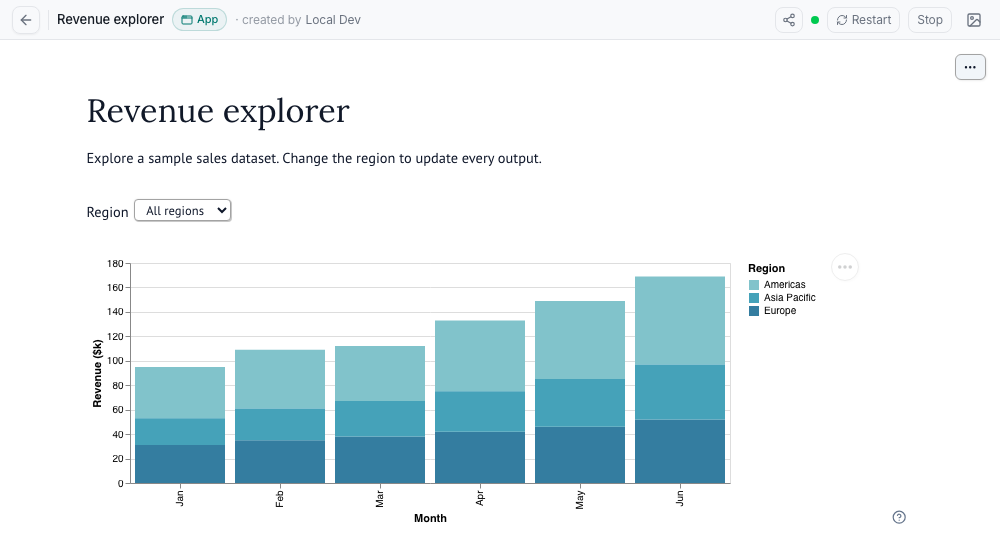
How it works
Shared sandboxes, with a separate session for each tab. "Run as app" assigns each page visit to a sandbox in the notebook's pool. Tabs and devices from the same account consume separate capacity slots. Browsers on a sandbox share files, credentials, and compute capacity, but each gets its own marimo session and UI state. The project page shows each sandbox's starter, version, occupancy, and pool state.
Apps serve a point-in-time copy. The app loads the notebook's saved state at start and never writes anything back — no version, no snapshot, no workspace change. Interacting with an app cannot modify the notebook. One caveat: local auxiliary files retain their mutable workspace semantics. Code and dependencies come from the selected committed version.
New visits receive the latest committed version. Periodic editor saves also create eligible versions. Active visits remain on their assigned sandbox while older versions drain. An explicit restart replaces the selected sandbox and disconnects its users, so the hub asks for confirmation.
Apps stay up while in use. Open app tabs keep the session alive. After everyone leaves,
MARIMOHUB_SESSION_APP_IDLE_TIMEOUT_SECONDScontrols idle retirement after the last assignment expires, including reconnect grace. This value inheritsMARIMOHUB_SESSION_IDLE_TIMEOUT_SECONDSwhen unset. Fresh visit leases and active connections protect against idle retirement. Credential expiry and provider lifetime limits still apply.The maintenance worker handles hub-managed idle reaping and the "~N connected" count. Without this worker, the hub does not reap idle apps. Provider idle fallbacks and maximum lifetimes can still stop the sandbox. If an app stops under an open tab, the page shows the reason.
Resource model.
marimo runstarts one kernel per connected browser inside each app sandbox, so memory scales with its concurrent browser sessions. Set the visit limit per sandbox to distribute browser sessions across additional sandboxes.
Start an app from Open → Run as app in the notebook header, or via the API: POST /api/v1/projects/{pid}/notebooks/{nid}/sessions with body {"mode": "app", "app_visit_id": "<unique-visit-id>"}. The router assigns a new visit to the latest committed version. Reuse app_visit_id when retrying admission. Use the returned app_assignment for heartbeats and departure.
Use marimo-studio
marimo-studio adds custom views to a notebook. You can edit a view beside the notebook and serve the default view through Run as app.
Workspace files are shared
Workspace persistence includes hidden files such as .env and .git/. Any project member with read access can retrieve these files. Keep credentials out of workspace files. Use integration secrets for credentials. See secrets handling.
For local notebooks, configure the deployment to save view files between sessions:
bashMARIMOHUB_PERSIST_WORKSPACE=workspaceThe default,
source, saves only the notebook's entrypoint (notebook.pyunless imported with a different entry file) andpyproject.toml. In editor sessions that save edits, notebooks imported from a folder always save their full workspace. See the configuration reference.Stop the editor session. Open Browse files and edit the notebook's entrypoint (
notebook.py, or the entry file chosen at import). Add this metadata, or merge it into the existing script header:python# /// script # dependencies = ["marimo-studio>=0.2.3"] # # [tool.marimo-studio] # default = "dashboard" # view_root = "studio" # ///Save the file. For Git-synced notebooks, edit the repository and sync again. The next sandbox start installs the dependency.
Open the notebook and run its cells. Select Add view, keep
dashboard, choose HTML document, and select Create view.Save the notebook and view files:
- Local notebooks: Stop the session to save the view files under
studio/dashboard/. - Git-synced notebooks: Before stopping the session, save the updated notebook and
studio/files to the repository. Commit and push them to the tracked branch, or publish a pull request and merge it into that branch. Publishing view files requires a synced version that includes.git. Then sync the notebook again. Git-synced sessions discard edits at teardown, even with workspace persistence enabled.
- Local notebooks: Stop the session to save the view files under
Select Open → Run as app to serve the saved default view.
The marimo-studio guide for marimohub covers supported marimo versions, other starters, storage limits, and troubleshooting.
Copy app and snapshot URLs
From an app, select Share app → Copy URL to copy its current URL. From an editor, select Share notebook → Copy URL. Copied URLs preserve allowed query parameters and remove reserved parameters. Copying a URL does not change notebook permissions. Recipients must sign in and have access to the requested view.
To share saved outputs without starting a sandbox, select Open → View static outputs. On the snapshot page, select Share snapshot → Copy URL. A snapshot URL with ?version=<version-id> keeps that version selected. Without a version parameter, the URL opens the latest captured outputs. App users cannot open snapshots because their role does not grant access to saved HTML.
Authenticated app links
From a notebook, open Share notebook → App links to create or copy a URL such as /app/sales. Project managers and admins can create and remove links. Each name is unique across the hub and contains 1–63 characters, including / separators. Names can have segments, such as team/sales. Each segment contains lowercase letters, digits, or hyphens, and starts and ends with a letter or digit.
Links inherit the notebook's permissions. Recipients must sign in and have permission to run the app. Several names can point to one notebook, and each uses the same notebook pool and visit assignments.
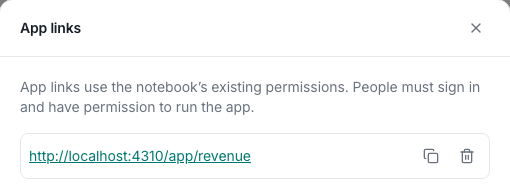
Removing a link releases its name immediately. Old shared URLs can then open another notebook that registers the same name. Removal does not stop running apps or change notebook permissions. Deleting the notebook or project also releases its names.
Link between apps
A link inside a notebook can open another app in the outer Hub page. First, create an app link for the target notebook. Then use its path in HTML output or mo.nav_menu:
mo.Html('<a href="/app/match?id=xyz">Open match</a>')

mo.nav_menu({"/app/match?id=xyz": "Match"})
HTML links also accept app/match?id=xyz without the leading slash. Hub supplies its origin and deployment prefix, so the link does not need the sandbox hostname. The target receives the link parameters, including repeated and empty values. Hub removes reserved parameters and parameters from the source sandbox URL. The target keeps its existing sign-in and access requirements.
This works in Hub app and editor views with a connected notebook bridge. Normal clicks open the target in the same tab. New-tab actions use the Hub URL. Downloads and external links retain their normal behavior. Standalone sandbox pages, static outputs, nested iframes, forms, and programmatic redirects do not use this feature. Existing sandbox sessions need a restart after the upgrade.
Notebooks with query parameters
App and editor URLs pass query parameters to the notebook iframe:
/app/<slug>?id=123
/projects/<project-id>/notebooks/<notebook-id>/app?id=123
/projects/<project-id>/notebooks/<notebook-id>?id=123
Read them with mo.query_params(). For these links, mo.query_params()["id"] returns "123".
- Sharing: Sign-in and Copy URL preserve the app or editor URL and its allowed parameters. Run as app carries allowed parameters from the editor to the app. App links includes them in alias links, copied URLs, and previews. Slug registrations store no query parameters.
- App tabs: Each app tab receives its own parameters. Static outputs and secondary tools receive none.
- Values: The iframe URL preserves repeated parameters, empty values, and encoded characters. Marimo determines how repeated parameters reach Python.
- Updates:
mo.query_params()changes mirror into the Hub URL without reloading the notebook. Copy URL and app links use the current parameters. Explicit Hub query navigation still reloads the iframe while reusing the sandbox. Theme changes and stripped parameters do not trigger reloads.
The bridge installs automatically when an app or editor session starts. Existing sessions need a restart. It works without proxy exposure or an image rebuild and depends on marimo's lifespan and HTML-head contracts. Unsupported runtimes continue without synchronization. Static outputs and scheduled jobs receive no bridge configuration. A fresh app initializes from its query parameters. An editor reconnect can retain existing Python state. The bridge does not provide full two-way Python history restoration. See the bridge package guide for runtime and protocol details.
Shared URLs keep the notebook path
The hub mirrors the path of the notebook frame into the __mh_path query parameter. Reload, retry, and restart restore that path, and so do Copy URL, Run as app, and app links. The sandbox itself must serve deep routes; the hub has no server-side fallback. Sessions started on an older sandbox image restore the path but do not report path changes until they restart.
Reserved parameters
The hub strips these names from the parameters forwarded to the notebook, including duplicates and encoded names, and from copied links except where noted:
- Authentication and session controls:
access_token,refresh_token,session_id,auth_error. - Display and runtime controls:
theme,show-code,include-code,kiosk,vscode,file,view-as,show-chrome. - Hub navigation state:
__mh_path. Notebook code never sees it, but a valid value stays in copied links so they keep the notebook path.
Existing sandbox URL parameters take precedence. The hub then applies its theme and hides code in app mode. The iframe omits the referrer header to avoid sending the unfiltered outer URL. Query parameters are user input and grant no access to notebooks or data.
Published URLs inside the sandbox
Editor, app, and preview sessions set MARIMOHUB_CONTEXT_FILE to an absolute path outside the workspace. Secondary surfaces in the same sandbox see the same variable. See Sandbox environment for every variable the hub sets. The JSON file contains:
| Field | Meaning |
|---|---|
schema_version | 1. A breaking change to the document increments it. |
public_url | The marimo endpoint without credentials, query parameters, or fragments. Deployment prefixes and signed proxy paths remain intact. |
notebook_url | The notebook or preview page in the hub. Use this for links to other users. |
exposure_mode | subdomain or proxy. |
persistence_mode | source: notebook and dependencies only. workspace: also saves workspace files. none: session edits do not persist. |
session_mode | edit or app. |
For local editors whose edits persist, persistence_mode is source or workspace, as configured by the deployment's MARIMOHUB_PERSIST_WORKSPACE setting. Apps, temporary editors, viewer sandboxes, previews, and Git-synced notebooks report none. A tool can use this value to warn before it creates files that will not persist.
The file can be missing, including during startup. Consumers must tolerate a missing file, an absent variable on older deployments, and unknown fields. Scheduled jobs omit the variable. In subdomain exposure mode, a failed context write does not stop the session; the hub logs a warning. In proxy exposure mode, the context is written with the other startup files, so a failed write fails the session start.
After the file becomes available:
import json
import os
from pathlib import Path

context = json.loads(Path(os.environ["MARIMOHUB_CONTEXT_FILE"]).read_text())
notebook_link = context["notebook_url"]
callback_url = context["public_url"].rstrip("/") + "/oauth/callback"
The context file changes no authentication. Sandbox authentication still applies, and signed proxy paths do not bypass hub authorization. When sandbox authentication is off, public_url on its own can grant kernel access on some compute backends. Share notebook_url with people, and send public_url only to services that you trust with the kernel. Paths and URLs can change after a sandbox restart. The context does not publish extra ports or guarantee a stable OAuth callback.
Who can do what
App users can start and use apps regardless of MARIMOHUB_VIEWER_MODE. Viewer access depends on that setting; editors and higher roles have full app access.
| Action | app-user | viewer, static (default) | viewer, applications or ephemeral-sandbox | editor and higher |
|---|---|---|---|---|
| Start, open, interact, and keep an app alive | x | x | x | |
| Stop or restart an app | x |
Static viewers can see app activity indicators but cannot use apps. Viewer mode grants no project membership or default role. The server enforces these permissions on every API request.
Stakeholders: the App user role
Assign app-user to people who need live apps without source access. The Apps gallery at /apps lists every active notebook in accessible projects, grouped by project. App links inherit those permissions. No publishing step is required.
| Capability | App user |
|---|---|
| Discover app titles and project names | Allowed |
| Start, attach, interact, and send heartbeats | Allowed |
| Stop or restart the shared app | Denied |
| Source, workspace files, versions, and saved HTML | Denied |
| Job outputs and logs | Denied |
| Editors, temporary sandboxes, and terminals | Denied |
| Direct integration queries | Denied |
| Manage projects, notebooks, members, or app links | Denied |
Viewers retain source access and their configured runtime modes, including ephemeral sandboxes. An explicit viewer membership overrides an app-user default, even when viewer mode is static.
Users with only app-user access land in the gallery. Users with higher roles in other projects retain the normal hub and an Apps navigation link. Permissions apply separately to each project. App-only users need the project-creator entitlement or super-admin status to create a project, even when project creation is open.
Assignment
Assign the role through any of these mechanisms:
- Project membership: choose App user in the member dialog or send
app-userthrough the membership API. - Deployment default:
MARIMOHUB_DEFAULT_ROLE=app-user. - Project default access: choose App user for default access on one project.
- OIDC groups: configure the groups claim and set
MARIMOHUB_AUTH_OIDC_DEFAULT_APP_USER_GROUPS=stakeholders. - Login policy: return the
default-role:app-userentitlement.
Set MARIMOHUB_DEFAULT_ROLE=none if groups should provide the only deployment-wide role grants. Without a project default, the highest of the deployment default, OIDC group defaults, and login-policy default-role:* entitlements wins. A project default, when set, replaces all of those sign-in defaults, even when it is lower. For example, none removes an OIDC app-user grant on that project. Explicit project membership overrides all defaults.
Source protection and revocation
Apps run with code inclusion disabled. App users receive only app metadata and limited session details. Authors remain responsible for source or sensitive data that their notebooks display or offer as downloads. App inputs can use the notebook's configured integrations, secrets, and federated credentials. Grant app access only to audiences you trust with what the app can compute or fetch.
When a role or viewer-mode change removes app access, the hub blocks new admissions. Existing access depends on the sandbox exposure mode:
proxy: each kernel request and WebSocket handshake rechecks access.subdomain(default): previously issued kernel URLs remain usable until the app stops. Stop or restart the app to revoke those URLs.
A role change cannot remove source that a former viewer already downloaded.
Upgrade and rollback
Upgrade all replicas before assigning app-user or enabling its default or OIDC mapping. Older replicas cannot parse the new role. Existing memberships do not change during the upgrade.
Session responses omit user_id for app-only callers, including app-scoped tokens without project.read. Clients must handle its absence. Authorized project readers still receive it.
Before rollback, remove app-user assignments and configuration, or explicitly choose replacement roles. Do not automatically replace app-user with viewer: viewer grants source access.
Verification
Run uv run scripts/test-app-source.py to check the pinned marimo runtime. The test checks interaction, independent session state, bootstrap data, WebSocket messages, error output, source endpoints, and HTML exports. CI runs this check with the Chromium end-to-end job.
Configuration
| Variable | Effect on apps |
|---|---|
MARIMOHUB_VIEWER_MODE | applications or ephemeral-sandbox enables viewer app access. Default static denies it. App users are unaffected. |
MARIMOHUB_APP_MAX_VISITS_PER_SESSION | Browser sessions per sandbox; unset means unlimited. |
MARIMOHUB_APP_MAX_SESSIONS_PER_VERSION | Unexpired starting reservations and ready sandboxes per notebook's current version; unset means unlimited. |
MARIMOHUB_MAX_APPS_PER_PROJECT | Physical app sandboxes per project, including draining versions (default 5, 0 = unlimited). |
MARIMOHUB_MAX_SESSIONS_PER_USER | Also bounds the apps a single user may have started, across all projects. |
Legacy upgrade note. Releases introducing app mode also grant app access to existing
ephemeral-sandboxviewers. There is no mode that grants ephemeral editors without shared apps. Usestaticif viewers must not reach shared apps, which carry credentials that ephemeral editors never receive. Upgrade the maintenance replica first: builds predating app mode treat apps as edit sessions.
See Configuration for the full reference and Auth for roles and viewer modes.
Gallery thumbnails
Use Edit thumbnail to upload and crop a screenshot of your app. See Notebook thumbnails for screenshot shortcuts and automatic previews.