Editor sessions
MARIMOHUB_EDITOR_SANDBOX_SHARING controls who can use a notebook's persistent editor sandbox. It applies to project editors, managers, and admins. It does not affect viewer sessions or notebook apps.
MARIMOHUB_EDITOR_SANDBOX_SHARING=shared    # default
# or
MARIMOHUB_EDITOR_SANDBOX_SHARING=exclusive| Mode | Persistent sandbox access | Other editors can | Best for |
|---|---|---|---|
shared | All project editors, managers, and administrators | Attach to, stop, or restart the sandbox | Trusted teams, pair editing, and classrooms |
exclusive | One editor owns the persistent sandbox | Start a temporary sandbox or take over | Workflows with user-specific state or settings |
Shared mode
shared keeps one persistent editor sandbox per notebook. Every editor who opens the notebook attaches to the same marimo session. If project editors do not trust each other, do not use this mode. marimo handles simultaneous editing, and marimohub does not make later editors read-only.
Treat a shared sandbox as a shared login. Every attached editor can use the same Python process, files, integration configuration, and federated credentials. The sandbox also uses the configuration and AI identity issued to the editor who started it. Any editor can stop or restart the sandbox, which disconnects everyone. Saves are attributed to the editor who started the sandbox.
Exclusive mode
exclusive gives one editor the persistent sandbox. Other editors see the owner and the connection state before they start more compute:
- Active: The kernel reports one or more connections.
- Idle: The kernel reports no connections.
- Starting: The sandbox is not ready.
- Unknown: marimohub cannot read the connection count. Treat the sandbox as active.
The displayed connection state can use a stored observation less than 30 seconds old. Before a takeover, marimohub always checks live activity. If the activity changed, you must confirm the takeover again.
A second editor can start an isolated temporary sandbox or take over the persistent sandbox. A temporary sandbox uses the normal editor compute profile. Unlike a restricted viewer sandbox, it receives integration configuration, federated credentials, and an AI identity for that editor.
Session surfaces share the sandbox's lifetime: a takeover or teardown stops VS Code and OpenCode together with marimo.
The temporary sandbox loads a copy of the workspace. It does not save:
- notebook code or versions
- rendered output or marimo session state
- workspace files
- filesystem snapshots
Exclusive mode isolates the live sandbox, not the stored project data. Other project editors can still read the notebook, version history, and workspace. The mode does not create a private mount for each user.
On CoreWeave, MARIMOHUB_COMPUTE_COREWEAVE_USER_HOME_TEMPLATE_ID names a sandbox template that mounts the per-user VAST directory. Persistent and temporary editor sandboxes then expose the authenticated user's directory at /mnt/<lowercase-email>; writes there outlive marimohub's notebook and workspace lifecycle. Apps and viewer sandboxes are never created from that template.
Browse and edit workspace files
Browse files on a notebook page opens the workspace mirror that the sandbox mounts (workspace/ in the bucket). Project editors can create, edit, rename, copy, move, and delete files and directories there without starting a sandbox. Viewers can browse and download only.
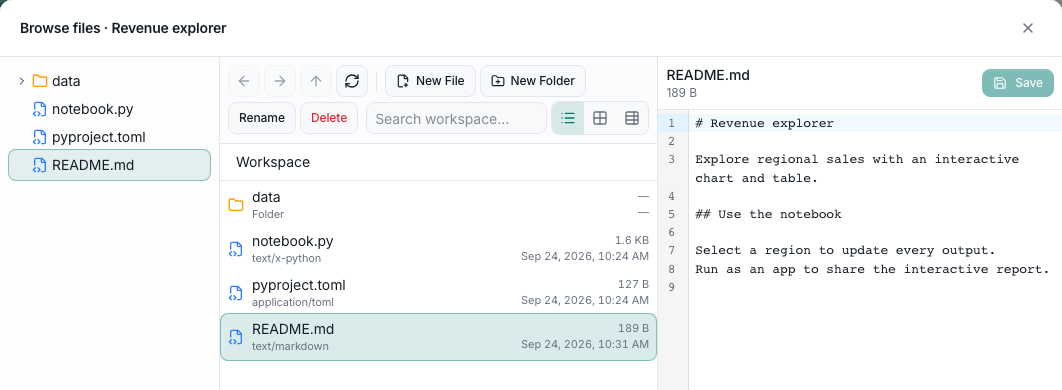
The browser is read-only when:
- the notebook is Git-synced (
git_source): the workspace is an immutable copy of the last sync; - you are a project viewer (
viewer); - an editor session is running (
active_session): the sandbox owns the files until it stops, so its next save does not overwrite yours.
The notebook's entrypoint (notebook.py unless imported with a different entry file) and pyproject.toml are protected. Editing them saves a new notebook version through the normal save path. They cannot be renamed, moved, deleted, or replaced by a copy.
If a move fails while deleting its source, the complete destination remains. A storage delete can complete after an error, even if the source initially appears intact. Keep the destination copy until you have recovered the files; do not delete it to retry the move.
Limits: 25 MB per file, 100 MB per workspace, and 1,000 files. Larger uploads are rejected with 413; a workspace over its total budget with 429.
The API exposes the same operations under /api/v1/projects/{pid}/notebooks/{nid}/workspace/, including GET …/workspace/search?query=<text> for a case-insensitive path search (up to 200 results) and GET …/workspace/entries?path=/&limit=<n> for paged directory listings. See the API reference.
Takeover safety
Takeover always requires confirmation. The warning identifies the current owner and shows the connection state. After confirmation, marimohub:
- Reserves the current owner and connection state.
- Saves the notebook and the files allowed by
MARIMOHUB_PERSIST_WORKSPACE. - Destroys the old sandbox.
- Allows the new owner to start the replacement sandbox.
The replacement cannot start until the compute provider confirms that the old sandbox is gone.
If the save fails, marimohub does not destroy the old sandbox or start a replacement. If destruction fails, the editor claim remains protected and no replacement starts. Retry the same takeover request to continue the drain. Reconciliation can also destroy the old sandbox before the retry.
Only one retry can drain the old sandbox at a time. A recovery attempt renews its lease every minute while it works. Concurrent requests must retry later. A lease expires after ten minutes without a successful renewal, and an expired holder cannot renew it. Renewal also stops after 30 minutes without progress. Finishing notebook capture, filesystem snapshotting, or sandbox destruction starts a new 30-minute progress window. Another API replica can then continue recovery if the original worker stopped or its current operation is stuck.
If the requester has a temporary sandbox, it remains available until the replacement is running. marimohub then stops that temporary sandbox and discards its work.
An unused requested reservation expires after five minutes. A draining or ready reservation does not expire automatically. These states prevent a second persistent writer after the old sandbox is destroyed. If replacement provisioning fails, the requester can start it again from the ready state.
Provider filesystem snapshots are owner-scoped in exclusive mode. A new owner does not restore the previous owner's snapshot. Exclusive mode also ignores legacy snapshots that do not identify an owner. Shared mode can restore the latest snapshot regardless of who created it.
Session cleanup
If you open a notebook while its previous editor session is still being cleaned up, the request returns 409 EDIT_SESSION_RETIRING and the notebook shows a cleanup message with a Retry button. The session lifecycle sweep, the 5-minute maintenance cycle, Stop, or an administrator finishes the cleanup. Cleanup waits for:
- Provisioning grace. A session that expired while provisioning gets 15 minutes from creation, unless its kernel is already ready.
- Teardown grace. A fresh Stop or takeover gets 15 minutes to finish.
- Idle kernel. Before the session's authorization deadline, automatic cleanup must confirm that no editors are connected. After the deadline, automatic cleanup does not check. An administrator reclaim never checks.
- Attachment. To save edits, the compute provider must attach to the existing sandbox. If the sandbox is gone, the claim is released; any other attachment error keeps the sandbox and the claim.
Providers that cannot attach (currently Cloudflare) keep sessions that may hold unsaved edits until a super admin reclaims them without saving. This applies only before the session's authorization deadline. After it, automatic cleanup destroys the sandbox without saving. See Reclaim a stuck editor sandbox.
Changing the sharing mode
marimohub records the effective sharing mode on each editor session. A configuration change does not change a running session.
Use a maintenance window in either of these cases:
- You change this setting.
- You upgrade from a release that does not use editor claims.
During the maintenance window:
- Stop or drain all edit sessions.
- Stop every old API replica.
- Apply the setting and start the new replicas.
Do not mix replicas with different editor-claim protocols
An old replica can start a second persistent writer. A Helm restart after a ConfigMap change does not drain editor sessions for you.
Session limits
Each temporary sandbox consumes one slot from the per-user session limit. Attaching to a shared sandbox does not consume another slot. During a takeover, the requester's temporary session does not block the replacement under this limit. marimohub stops the temporary session after the replacement starts.
Scope
This feature coordinates sandbox ownership. It does not add a conflict-free replicated data type (CRDT), make other editors read-only, or create per-user mounts.
API
Clients can inspect ownership with GET /api/v1/projects/{pid}/notebooks/{nid}/editor-session. In exclusive mode, a normal create request returns 409 EDIT_SESSION_OWNED when another editor owns the sandbox. Send edit_intent: "temporary" to create a discard-only editor sandbox.
To take over an exclusive session:
- Read the current holder and activity from the editor-session endpoint.
- Ask the user to confirm the displayed state.
- Send that holder and activity to the takeover endpoint with a stable
takeover_id. - If the endpoint returns
503, retry the same request andtakeover_id. - After takeover succeeds, create a normal editor session without
edit_intent.
If the holder or activity changes, the takeover returns 409 EDIT_SESSION_CHANGED. Read the new state and ask the user to confirm it. The OpenAPI document defines both request bodies.